Basic concepts
Here we explain, in broad strokes, how Modelblocks modules are structured and how to interact with them. We only focus on aspects that regular users will interact with when using a module for their own research.
Required reading
This section assumes users are familiar with Snakemake.
We recommend reading the following sections in the Snakemake documentation before continuing:
Looking for more in-depth information on modules?
Please consult our development guidelines.
General structure
At their core, Modelblocks modules consist of a sequence of rules that download, filter and transform data.
The behaviour of each rule is determined by the module’s internal code, and a user-specified configuration file which alters code behaviour. Each module also defines how to interface with it through a standardised interface. The location of configuration and interface files is standard across all Modelblocks modules, and is defined by our Convention.
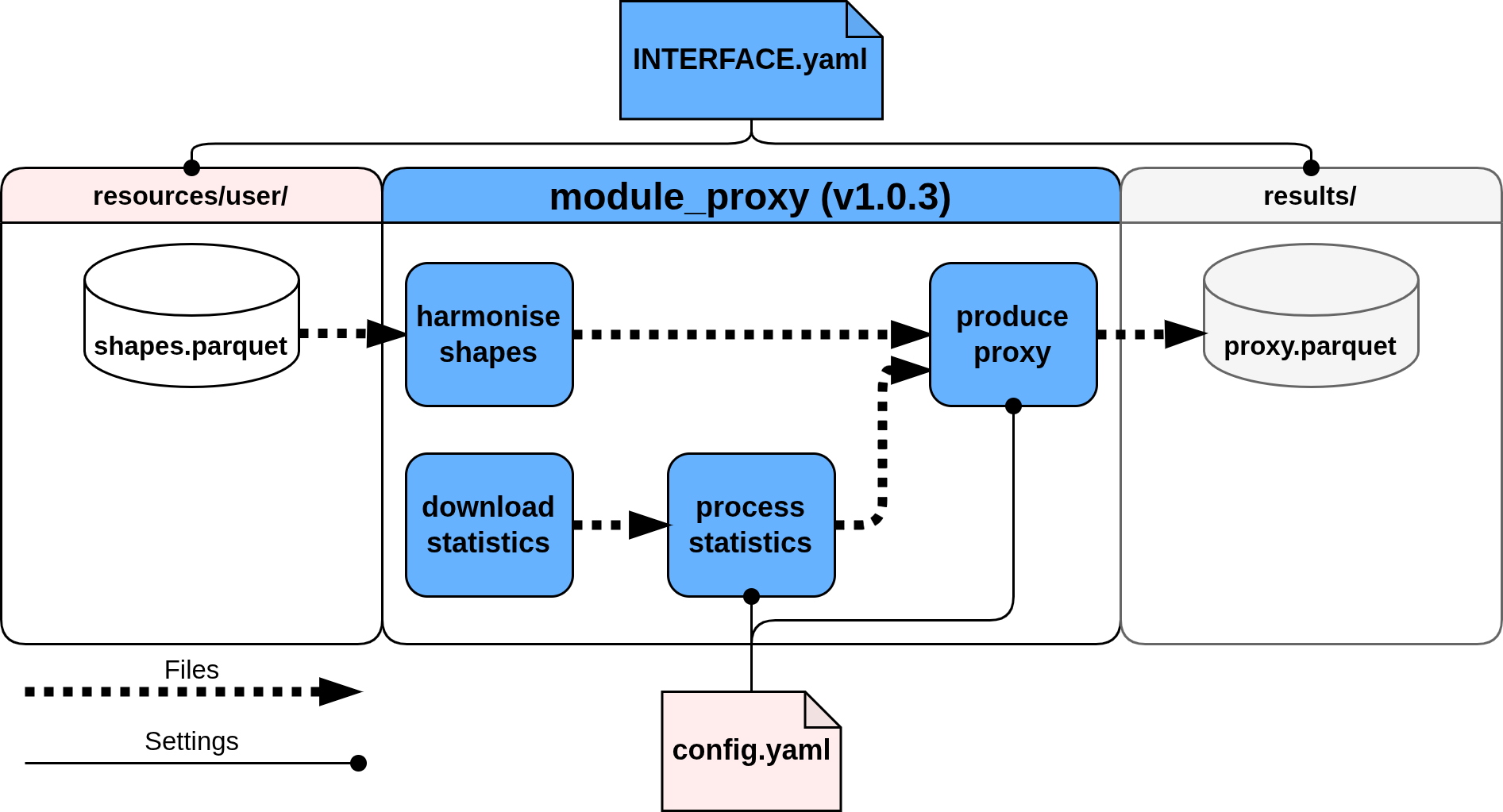
Configuration
Configuration values allow users to tweak module behaviour.
Modules will generally provide example configurations and recommended defaults in the config/ directory.
You should expect modules to validate the provided configuration against a schema (config.schema.yaml) during execution, with incorrect configurations raising errors.
The schema file itself is also a useful resource to understand a module's capabilities.
.module_name/
├── config/
│   ├── README.md # (1)!
│   └── config.yaml # (2)!
└── workflow/
    └── internal/
        └── config.schema.yaml # (3)!
- Configuration documentation.
- Example configuration file.
- Configuration schema file.
Interfacing
The interface file (INTERFACE.yaml) defines the placement and naming of the files needed by the module.
- Always located at the top level of the module's repository.
The interface file will always specify the version of our Convention that the module complies with, multiple sets of pathvars that can re-wire the location of the files consumed / produced by the module, and a set of wildcards which can be used to process multiple files using the same module.
In general, the interface file will define three different sets of pathvars:
snakemake_defaults: composed of logs, resources and results directories. These are pre-defined bySnakemakeuser_resources: these are the "input" files that users must provide to the module before execution.results: the module "output" files that are relevant to users.
Interface file example
Interface requirements will vary per module. The following is a generic example of a module with one input and one output file.
convention_version: v1.0.0 # (1)!
pathvars:
  snakemake_defaults: # (2)!
    logs:
      default: "<logs>"
      description: "location of rule log files."
    resources:
      default: "<resources>"
      description: "location of module resource files."
    results:
      default: "<results>"
      description: "location of module results."
  user_resources: # (3)!
    shapes:
      default: "<resources>/user/{shapes}/shapes.parquet"
      description: "region-specific polygons to process."
  results: # (4)!
    proxy:
      default: "<results>/{shapes}/proxy.parquet"
      description: "proxied statistics using the provided shapes."
wildcards: # (5)!
  shapes: geo-political regions to process
- Convention version, based on this documentation.
- Default
pathvarsdefined bySnakemake. Used to re-wire the location of all files in these directories. - Notice that these reuse the
<resources>pathvar! - Notice that these reuse the
<results>pathvar! - Available wildcards.
These are used in either
user_resourcesorresults.
Importing
Modules can be directly imported by other workflows with minimal effort using the module command.
At minimum, users must specify the module's GitHub repository and version tag under snakefile, and provide the necessary module configuration under config.
module module_example:
    snakefile:
        github(
            "modelblocks-org/module_example",
            path="workflow/Snakefile",
            tag="v1.0.3"  # (1)!
        )
    config: config["example"] # (2)!

use rule * from module_example as module_example_*  # (3)!
- The tag should be an official module release. This ensures the module is not impacted by future updates, which may alter its behaviour or resource/configuration requirements.
- We recommend storing module configuration under module-specific keys, or in separate files.
- Adding a prefix to the module's rules avoids naming conflicts.
File placement
When imported, modules will also follow a convention on the default location of files they expect to consume and/or produce.
.my_project/
├── logs/  # (1)!
├── resources/
│   ├── automatic/ # (2)!
│   └── user/ # (3)!
└── results/ # (4)!
- Per-rule log files, useful for debugging.
- Automatic resources are all the intermediary files created by module rules.
- User resources are all the input files that a module needs before execution. These might be optional in some cases.
- Output files relevant to users.
Rewiring files
You will often want to modify the expected locations of module logs, resources, and results. This can avoid file name conflicts, as snakemake does not allow multiple rules to produce the same file, and allows you easily run intermediate rules on module outputs before feeding their results into other modules.
This can be easily handled by re-defining pathvars when importing modules.
Rewiring module logs and results
module module_example:
    snakefile:
        github(
            "modelblocks-org/module_example",
            path="workflow/Snakefile",
            tag="v1.0.3"
        )
    config: config["example"]
    pathvars:
        logs="modules/example/logs/"
        proxy="results/modules/example/proxies/{shapes}.parquet" # (1)!
- Notice how the "shapes"
wildcardwas changed to be the filename instead of the directory name.